- MVC : Architectural design pattern for web application .It stands for Model View Controller.
- ASP.NET MVC : A framework which is built on top of ASP.NET framework. And most of the features of the ASP.NET like membership providers, roles, etc can still be used.
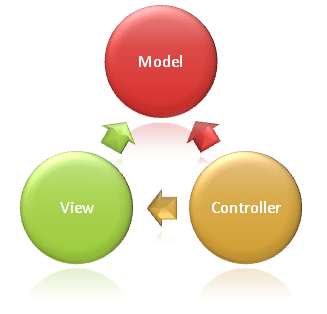
Following diagram shows the three main components and which ones reference the others
- Advantages of MVC :
- SoC – Separation of Concerns : provides a clean separation of the UI, Business Logic, Model or Data
- More Control over HTML, JavaScript and CSS
- Testability : good support for the test driven development
- No View State and thus reduces the bandwidth of the requests
- MVC application life cycle : MVC Request Processing details
- Fill route : This first step happens only once when an ASP.NET application first starts.The RouteTable maps URLs to handlers.
- Fetch route : If a match can be made, create “RouteData” object which has the details of which controller and action to invoke
- Request context created : RouteData object is used to create the “RequestContext” object
- Controller created :
- MvcHandler ProcessRequest() is called .
- RequestContext and the name of the controller are passed to the ControllerFactory.
- ControllerFactory create the controller class instance and
- invoke “Execute” method of the controller.
- Execute Action : Proper action method is called depending on Http verbs
- Return Result : Returns an instance of ActionResult.
- Nine ActionResults :
- View
- PartialView
- Json
- JavaScript
- File
- Empty
- Content
- RedirectToRoute (Redirect to any other controller and action method )
- Redirect (Redirect to any other action )
- Five Filters :
- Authentication Filters (IAuthenticationFilter ) ( MVC 5 feature )
- AuthorizationFilter (IAuthorizationFilte) [Authorize(Roles="trader")]
- ActionFilter (IActionFilter)
- ExceptionFilter (IExceptionFilter)
- ResultFilter (IResultFilter)
- Three ActionFilter :
- [Authorize] : restricts users or roles
- [OutputCache] : caches the output of a controller action for a specified amount of time (Duration)
- [HandleError]
- ActionFilterAttribute :
- Base class
- implements both the IActionFilter and IResultFilter interfaces
- Filter Methods and Execution Order :
- OnAuthorization()
- OnActionExecuting()
- OnActionExecuted()
- OnResultExecuting()
- OnResultExecuted()
- OnException()
- AuthorizeAttribute base class for creating Authorize Filter
- HandleErrorAttribute base class for creating Handle Error Filter
- Exception Filters runs only if another filter or action method, or action result throws an exception.
- Authentication Filter confirms that a valid or invalid user
- Authorization Filters restricts access users or roles
- Filters run in the following order:
- Authorization filters
- Action filters
- Result filters
- Exception filters
- Within each filter type, the Order value specifies the run order.
- By default, the filters with the lowest scope runs first.
- Filter scope values :
- First = 0
- Global = 10
- Controller = 20
- Action = 30
- Last = 100
- Expicitly specifying order : [AuthorizationFilterA(Order=2)] and [AuthorizationFilterB(Order=1)]
- Global Filter Scope : GobalFilters.Filters.Add(new AuthorizationFilterA()); in FilterConfig.cs App_Start folder
- When we explicitly define Order , then Scope doesn't work. Otherwise it follows Scope .
- OnActionExecuting() and OnResultExecuting() follow forward order.
- OnActionExecuted() and OnResultExecuted() follow reverse order .[Action - Controller - Global ]
- HandleError filters run at last. For each Error Handler filter, for event runs in reverse order.
- HandleError will render the /Views/Shared/Error.cshtml view if an exception happens
- The HandleErrorAttribute will always be defined as global filter by default
- Controller itself is a filter and always run first.
- The Controller class already implements the IAuthenticationFilter, IAuthorizationFilter, IActionFilter, IResultFilter, and IExceptionFilter interfaces.
- We can override the desired methods directly in the controller and achieve the same outcome as the filters.
- [AllowAnonymous] lets users access the action or controller who have not been authenticated.(client token is not verified)
Routing :
- Two types of routing :
- Convention based routing ( RouteConfig.cs )
- Attribute based routing ([Route])
Convention based routing
- Registerroutes (RouteCollection routes) static method in RouteConfig.cs
- routes.IgnoreRoute("{resource}.axd/{*pathInfo}"); ignores resource files
- routes.Maproutes() method take three parameter (name .url , defaults , constraints)
- url: "{controller}/{action}/{id}"
- defaults: new { controller = "Home", action = "Index", id = UrlParameter.Optional }
- constraints: new { id = @"\d+" } (called as Route Constraints)
- RouteConfig.cs resides inside the App.Config folder
- Routes need to register it in the Application_Start() event in the Global.asax RouteConfig.RegisterRoutes(RouteTables.Routes)
- it includes all your routes into RouteTable
- We can register multiple custom routes with different names.
- MVC framework starts with first configured route and if incoming url doesn't satisfy the route then it will evaluate second route and so on.
Attribute based routing
- To enable attribute routing, call MapMvcAttributeRoutes() during configuration inside RegistrRoute() static method in Routeconfig.cs : routes.MapMvcAttributeRoutes()
- use {} for parameters
- [Route(“books/{isbn?}”)] - optional parameter
- [Route(“books/lang/{lang=en}”)] - default value
- [RoutePrefix("Books")] attribute on Controller use route prefix for all actions with "Books/"
- Just use [Route(“lang/{lang=en}”)] on Action
- (~) on the method attribute to override the route prefix [Route(“~/spotlight-review”)]
- [Route] attribute on the controller level capturing the action as a parameter [Route(“{action=index}”)]
- Route constraints can be used {parameter:constraint}. [Route(“users/{id:int}”]
- Route Constraints in MVC : int , bool ,alpha, datetime,float ... max,min,maxlength,range,regex
- [Route(“users/{id:int:min(1)}”)]
- IRouteConstraint interface for Custom Route Constraints
- [Route(“menu”, Name = “mainmenu”)] , Route Names
- [RouteArea(“Admin”)], Areas on Controller
State Management :
- There are three ways to pass/store data between the controllers and views :
- ViewData
- ViewBag
- TempData

- ViewData :
- ViewData is a dictionary object
- Data from controller to view
- Derived from viewDataDictionary class
- Requires typecasting for complex data
- Need to check null values
- Data available in the current request only
- Value become NULL if redirection occurs.
- ViewBag :
- ViewBag is a dynamic property
- It doesn’t require typecasting
- Data available in the current request only
- Value become NULL if redirection occurs
- TempData :
- Derived from TempDataDictionary class
- TempData keeps the data up to next HTTP Request
- Data from one controller to other controller or from one action to other action
- It requires typecasting for complex data type
- Need to check for null values to avoid error
Note : ViewBag,ViewData can’t pass data back to controller.
- MVC Life Cycle
- Routes
- Action Filters
- Session
- State Management
- Cache
- Cookie
- RenderScript
- Bundling & Minification
- HTML Helpers
- Design Pattern
- SOLID Principle
- Dependency Injection
- Action Result
- Global Exception Handling
- Form Authentication
- Request Forgery Token
- Membership
- Identity
- Areas
- Scaffolding
- Form Validation
- URL validation
- remote validation
- Render Section
- new in MVC 6
- WebSocket
- Globalization
- Localization
- resource file
- Compress and Decompress
- Unobtrusive JS
- RenderBody vs RenderPage
- RenderAction vs RenderPartial
- hybrid application
- Model Binding
Comments
Post a Comment